MAE Score Update
Overview
To adapt to changes with Yammer file storage and to make room for future signals, we are changing the default MAE Score for the tyGraph for Yammer product.
TABLE OF CONTENTS
Benefits
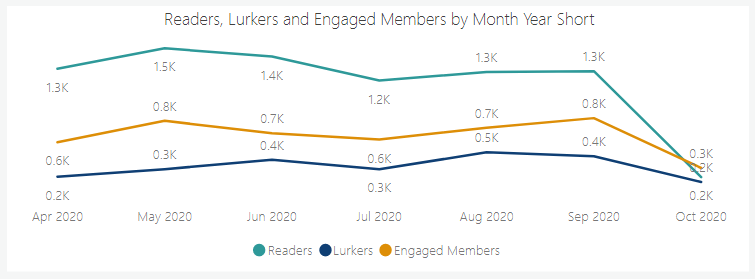
The new tyGraph MAE Score will be more stable because it will not be swayed by content volume or changes in rendering methods. Removing these activities also helps focus the MAE Score to prioritize community members who are making tacit contributions. This new standard will be a better indication of events where the user understood the Yammer content and did more than just render it. Finally, we hope this will help further differentiate Engaged Users from, Lurkers, and Passive Users. Which we will explain further below.
Adoption Journeys
New with this release will be a more distinct separation of user activity for the purpose of expressing our new concept of “User Adoption Journeys.” Many users start out reading content in Yammer, then Accessing Documents, liking conversations, and finally participating in discussions. We hope this further separation will provide clarity to the number of users exhibiting each of the three main behaviors: Passive, Lurking, and Engagement.
Default Activity Categorization
Engagement
- Messages
- Likes
- Shares
- Topic Mentions
- User Mentions
- Praises
- File Uploads
Lurking
- File Downloads
- File Views
Passive
- Reads
New & Legacy Options
MAE Score Selection To facilitate this change, you will notice the MAE Score selection area has file views and downloads unchecked and located in a separate section. You can enable the original counts or unique counts to be added back into the MAE Score at any time.
MAE Score Legacy Toggle – Located on the MAE Score Page. This will re-set your MAE Score to the legacy options. This will allow you to compare what your MAE Score would have been if it were left unchanged. This also applies for measures built on the MAE Score such as, Engaged Members, Engaged Communities, and Engaged Community Members.
Note: (Unique) Measures – (Unique) Views and Downloads aggregate to count one action per user per file. For example if Jane views a picture 5 times and Mark Views the same picture 1 time. File views (unique) would = 2. One for each user for that picture ever. This is seen as a middle ground for companies looking to count users accessing documents without concern for the volume of activity or skew from constant file modification.